
OPAL MCP Server: Setup & Installation Guide
A comprehensive guide to installing, configuring, and utilizing the OPAL MCP Server for advanced AI-driven data integration.
Introduction
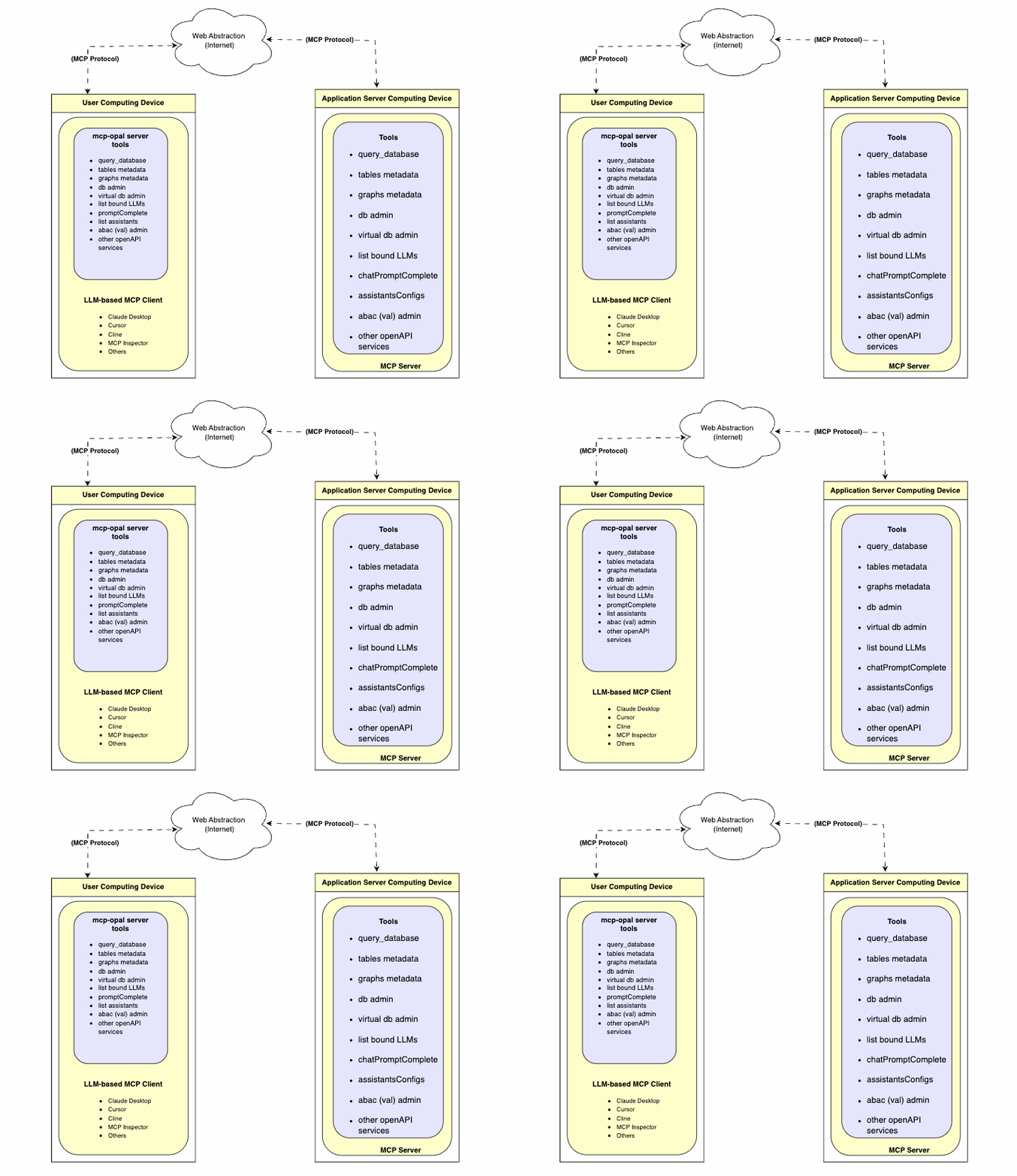
Prior to the emergence of the Model Context Protocol (MCP), functionality provided by Virtuoso's OPAL add-on middleware layer was only accessible through a limited set of options. The introduction of MCP provides an open standards-based interface for loosely coupled interactions with the powerful capabilities offered by OPAL.
This functionality is packaged as a collection of tools that support a wide range of operations, including:
- Deductive interactions with relational tables and entity relationship graphs.
- Comprehensive query execution (read/write).
- Unified Data Space Administration (databases, knowledge graphs, filesystems).
- Virtual Database Management for remote data sources.
- Seamless interactions with a broad spectrum of LLMs.
- Access to specialized OPAL Assistants and OpenAPI-based web services.
This guide provides comprehensive instructions for setting up, configuring, and utilizing the OPAL MCP Server, unlocking a new era of AI-driven data integration.
Benefits
- Universal Accessibility: Exposes OPAL functionality to any application or LLM that understands the OpenAPI specification.
- Enhanced Security: Implements robust, attribute-based access controls (ABAC) to ensure data privacy and security at a granular level.
- Simplified Integration: Offers a standardized API that simplifies the process of integrating OPAL's capabilities into new and existing workflows.
- Future-Proof: Aligns with modern development practices and the growing ecosystem of AI tools and services.
Capabilities
The OPAL MCP Server provides API access to a wide range of OPAL's core functionalities, including:
- Database Operations: Execute SQL queries, manage tables, and retrieve metadata.
- Graph Operations: Interact with graph data, manage named graphs, and perform complex graph-based queries.
- LLM Management: Register, bind, and manage Large Language Models for use within the OPAL ecosystem.
- Administrative Tasks: Perform database administration, manage user access, and configure system settings.
- AI-Powered Data Interaction: Leverage advanced features like
promptCompleteandchatPromptCompletefor sophisticated, context-aware data interactions.
Post-Installation Capabilities Overview
Setup and Installation
Setting up the OPAL MCP Server involves a straightforward process of installing the necessary Virtuoso components and configuring them to work together. Follow these steps to get started:
- Install Virtuoso: Ensure you have a working installation of Virtuoso 8.x or later. You can download the latest version from the official Virtuoso website.
- Install the VAD packages: The OPAL MCP Server functionality is delivered through a set of Virtuoso Application Definition (VAD) packages. You will need to install the following VADs in order:
virtuoso-vad-rdfmappersvirtuoso-vad-opalvirtuoso-vad-mcp
- Configure the MCP Server: Once the VADs are installed, you will need to configure the MCP Server settings through the Virtuoso Conductor. This includes setting up access controls, registering LLMs, and defining API endpoints.
Supported LLMs
The OPAL MCP Server is designed to be model-agnostic, allowing you to integrate with a wide variety of Large Language Models. Any LLM that provides an API compatible with the OpenAPI specification can be registered and used with the OPAL MCP Server. This includes popular models from providers like:
- OpenAI (GPT-3.5, GPT-4, etc.)
- Anthropic (Claude series)
- Google (Gemini series)
- Mistral AI
- And many others, including self-hosted open-source models.
Attribute-based Access Controls (ABAC)
Secure your OPAL environment with fine-grained access controls. By executing SPARQL commands, you can define who can log in and what actions they are permitted to perform, using standardized ontologies for precise rule definition.
Login Authorization for /chat endpoint
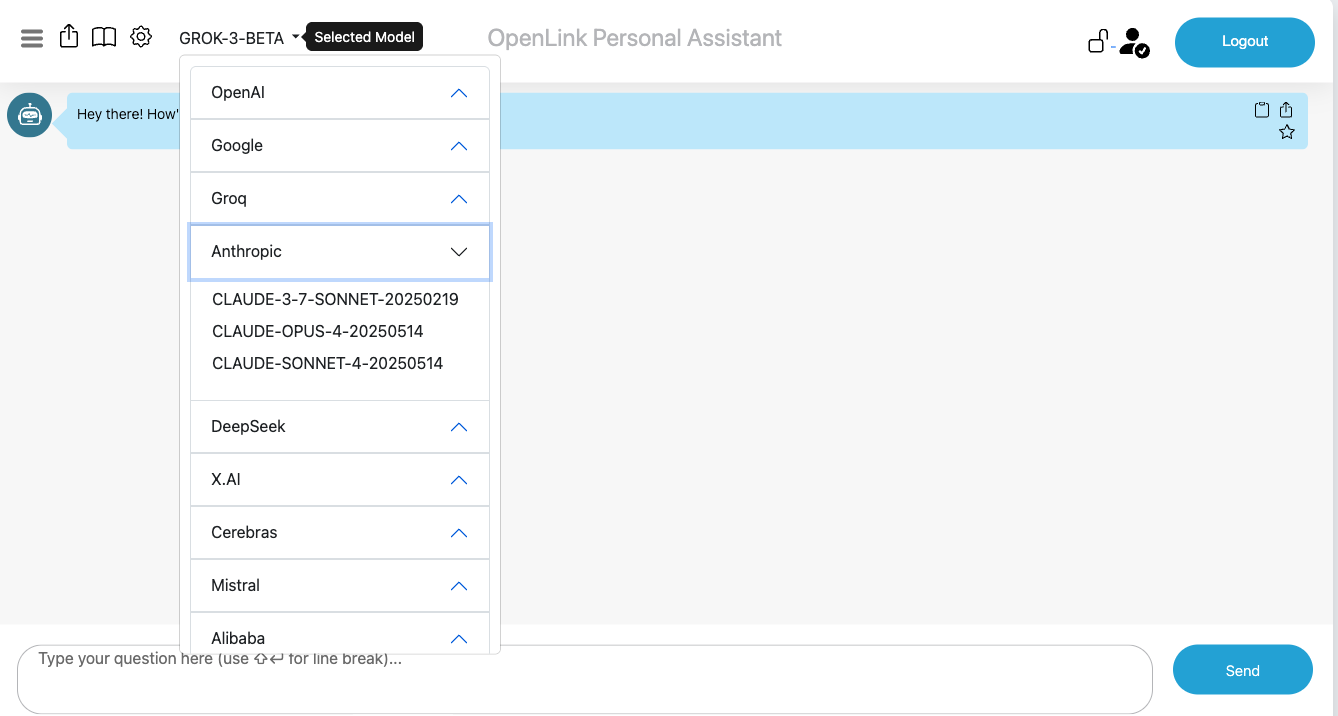
-- Grant dba user access to the /chat endpoint
PREFIX acl: <http://www.w3.org/ns/auth/acl#>
WITH <urn:virtuoso:val:default:rules>
INSERT {
  <#rulePublicChat> a acl:Authorization ;
      acl:accessTo <urn:oai:chat> ;
      acl:agent <http://localhost/dataspace/person/dba#this> .
} ;
Login Authorization for /assist-metal endpoint
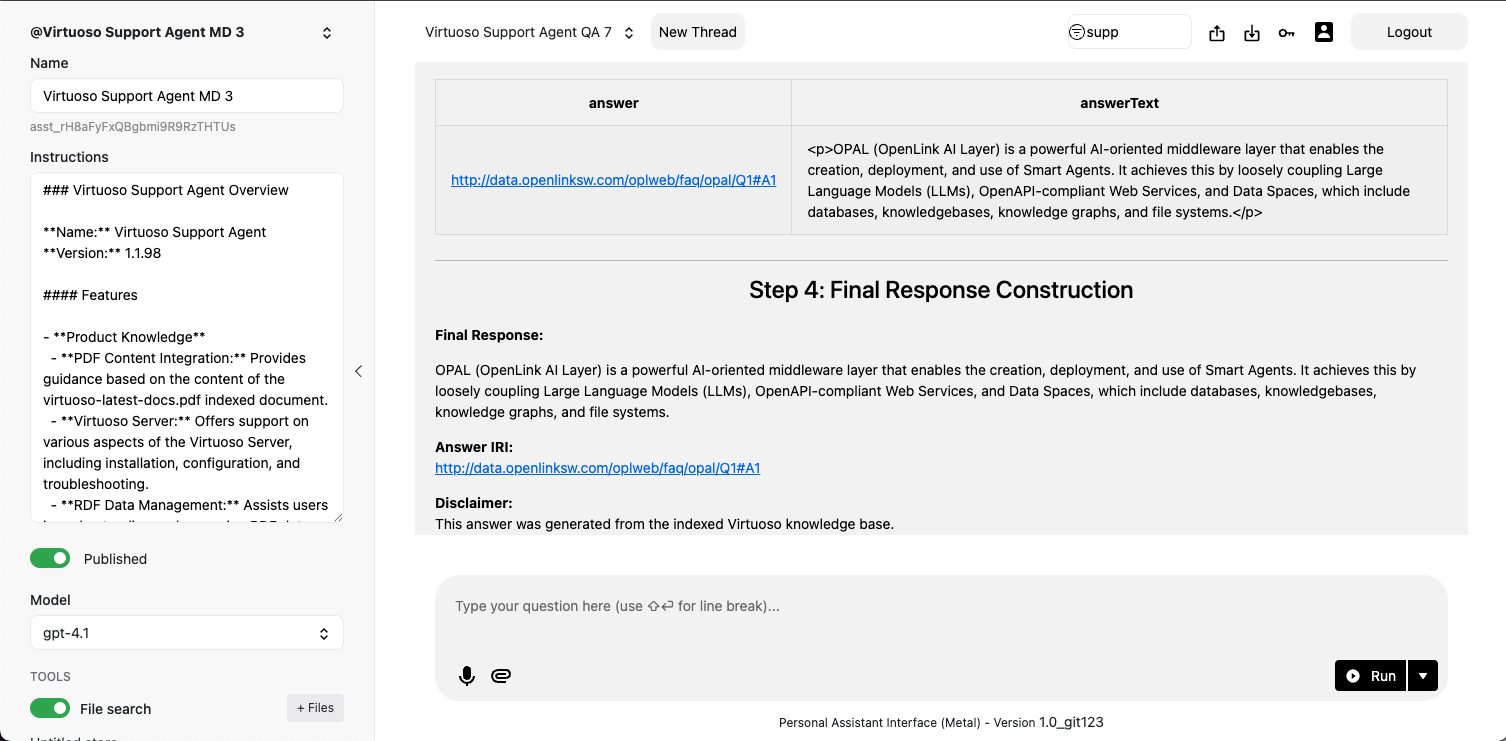
-- Grant dba user access to the /assist-metal endpoint
PREFIX acl: <http://www.w3.org/ns/auth/acl#>
WITH <urn:virtuoso:val:default:rules>
INSERT {
  <#assistantsAdmin> a acl:Authorization ;
      acl:accessTo <urn:oai:assistants> ;
      acl:agent <http://localhost/dataspace/person/dba#this> .
} ;
System-wide LLM API Key Registration
Rather than repetitively entering LLM API Keys when you log in, it might be preferred to have those keys registered system-wide. To achieve this goal, you need to create a restriction for successfully logged-in users by executing the following:
-- Create a restriction to allow system-wide API keys for the dba user
PREFIX oplres: <http://www.openlinksw.com/ontology/restrictions#>
WITH <urn:virtuoso:val:default:restrictions>
INSERT {
    <#restrictionAuthChatKey> a oplres:Restriction ;
        oplres:hasRestrictedResource <urn:oai:chat> ;
        oplres:hasRestrictedParameter <urn:oai:chat:enable-api-keys> ;
        oplres:hasAgent <http://localhost/dataspace/person/dba#this> ;
        oplres:hasRestrictedValue "true"^^xsd:boolean .
} ;
Large Language Models Registration & Use
To use a Large Language Model with the OPAL MCP Server, you must first register it. This process involves providing the server with the necessary information to communicate with the LLM's API, including:
- API key or authentication token
- Endpoint URL
- Model name and version
- Supported features and parameters
Bind your OPAL instance to one or more LLMs using the commands below in the Conductor or iSQL interfaces.
Listing Bound LLMs
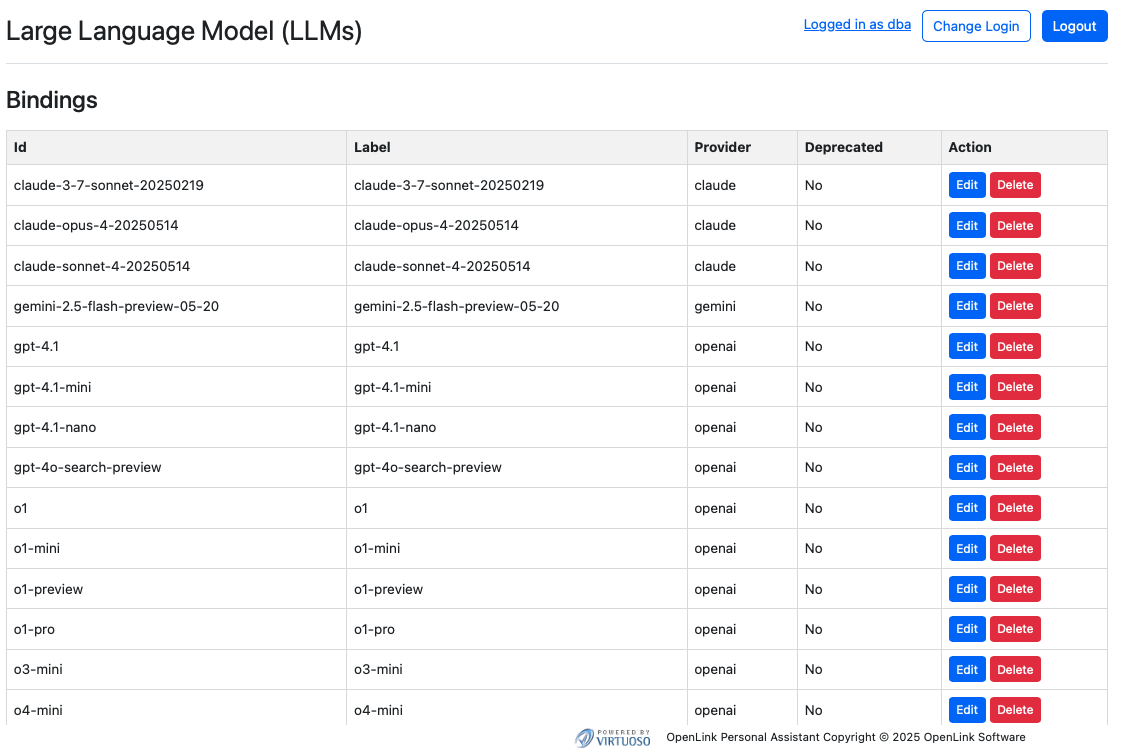
OAI.DBA.FILL_CHAT_MODELS('{Api Key}', '{llm-vendor-tag}');For providers like Google Gemini that don't offer API listing, use:
OAI.DBA.REGISTER_CHAT_MODEL('{llm-vendor-tag}','{llm-name}');You can view the effects of this command at: https://{CNAME}:8891/chat/admin/models.vsp
System-Wide LLM API Key Registration
To avoid entering API keys on every login, register them system-wide.
OAI.DBA.SET_PROVIDER_KEY('{llm-vendor-tag}', '{api-key}');Most commercial LLM providers have a standard registration process that is automatically handled by the OPAL MCP Server's setup wizard. For open-source or self-hosted models, additional configuration may be required.
Once an LLM is registered, it can be bound to specific users or roles, allowing you to control who can use which models and for what purposes.
API Access & Protocols
Your OPAL instance is API-accessible through multiple interfaces. Obtain credentials (OAuth tokens, Bearer Tokens) from the /oauth/applications.vsp endpoint to interact with your instance via protocols like MCP and A2A.
The OPAL MCP Server exposes its full range of functionality through a well-documented OpenAPI (formerly Swagger) specification. This specification provides a detailed description of all available API endpoints, their parameters, and the expected responses. You can use this specification to:
- Generate client libraries for your preferred programming language.
- Test API endpoints directly from your browser.
- Understand the capabilities and limitations of the API.
- Integrate with other tools: Use the OpenAPI specification to integrate the OPAL MCP Server with a wide range of other tools and services that support the standard.
The OpenAPI specification is available at https://{server-address}/opal/api/docs after the server is running.
Model Context Protocol (MCP) Usage
OPAL has built-in MCP support (client and server). Enable this by setting up CORS access for the /.well-known and /OAuth2 virtual directories in the Conductor UI.
MCP Server Endpoints:
- Streamable HTTP:
https://{CNAME}:8891/chat/mcp/messages - Server-Sent Events:
https://{CNAME}:8891/chat/mcp/sse
Other MCP Interaction Options
Bridge-based access is also available via our generic MCP servers for various runtimes:
Your OPAL instance as an MCP Client
As an MCP client, OPAL can bind to tools published by any MCP Server. You can test this by obtaining an API key from a public endpoint (like https://demo.openlinksw.com/chat/mcp/messages) and registering it in your instance's admin area at https://{CNAME}:8891/chat/admin/.
Agent-2-Agent (A2A) Protocol Usage
A2A support enables sophisticated workflows between AI agents. Agents are discoverable via a JSON-based Agent Card at https://{CNAME}:8891/.well-known/agent.json.
FAQ
What is the difference between OPAL and the OPAL MCP Server?
OPAL is the underlying middleware layer that provides the core data integration functionality. The OPAL MCP Server is a component that exposes this functionality through a modern, secure, and open API based on the Model Context Protocol (MCP).
Do I need a separate license for the OPAL MCP Server?
The OPAL MCP Server is included as part of the standard Virtuoso licensing. No separate license is required.
Can I use my own custom access control policies?
Yes, the ABAC model is highly flexible and allows you to create your own custom policies to meet your specific security requirements.
Glossary
- MCP (Model Context Protocol)
- An open protocol for securely connecting Large Language Models (LLMs) with application servers and data sources.
- OPAL (OpenLink AI Layer)
- A middleware layer that provides powerful data integration and virtualization capabilities.
- ABAC (Attribute-Based Access Control)
- A flexible and granular access control model that defines policies based on attributes of the user, data, and context.
- VAD (Virtuoso Application Definition)
- A package format for distributing and installing applications and modules within the Virtuoso platform.